 EN
EN
 AR
AR
 BG
BG HR
HR
 CS
CS
 DA
DA
 NL
NL
 FR
FR
 DE
DE EL
EL
 HI
HI
 IT
IT JA
JA
 KO
KO
 NO
NO PL
PL PT
PT RO
RO
 RU
RU
 ES
ES
 SV
SV
 TL
TL
 IW
IW
 ID
ID
 SR
SR
 SK
SK
 VI
VI
 HU
HU
 TH
TH
 TR
TR
 FA
FA
 AF
AF
 MS
MS
 SW
SW
 UR
UR
 BN
BN
 HA
HA
 KM
KM
 MN
MN
 UZ
UZ

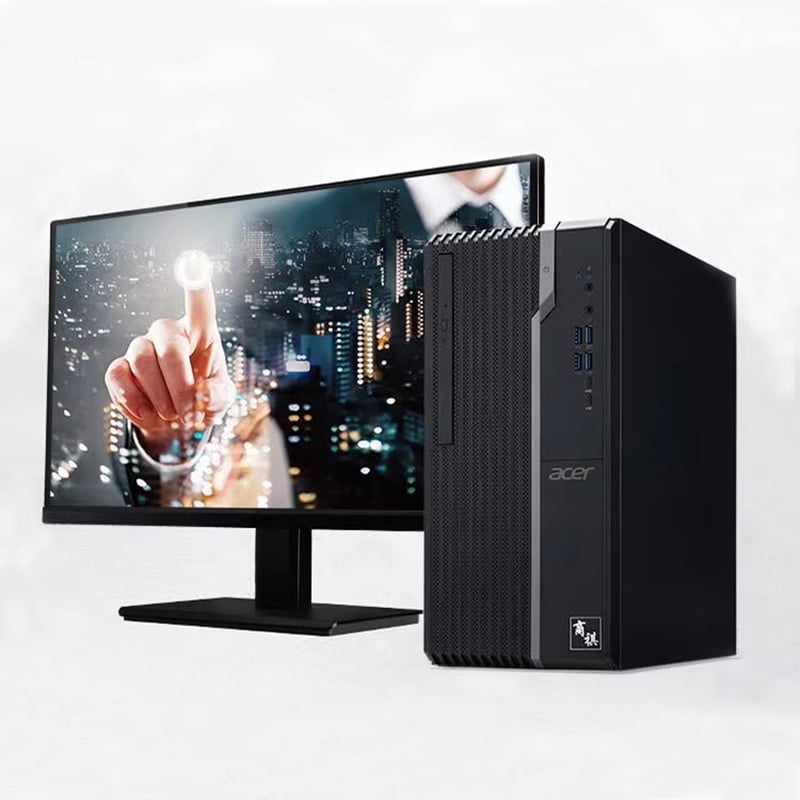
Các môi trường làm việc doanh nghiệp đòi hỏi các giải pháp điện toán có khả năng chịu đựng được các hoạt động vận hành hàng ngày cường độ cao, đồng thời duy trì hiệu năng ổn định trên nhiều ứng dụng kinh doanh khác nhau. Việc lựa chọn giữa các hệ thống máy tính để bàn dành cho người tiêu dùng và các hệ thống máy tính để bàn thương mại ảnh hưởng đáng kể đến hiệu quả vận hành, chi phí dài hạn và năng suất tổng thể của doanh nghiệp. Để hiểu rõ lý do vì sao máy tính để bàn thương mại vượt trội trong các môi trường doanh nghiệp, cần xem xét những khác biệt cơ bản về triết lý thiết kế, chất lượng chế tạo và tập hợp tính năng phân biệt các hệ thống chuyên dụng dành cho doanh nghiệp với các sản phẩm dành cho người tiêu dùng.
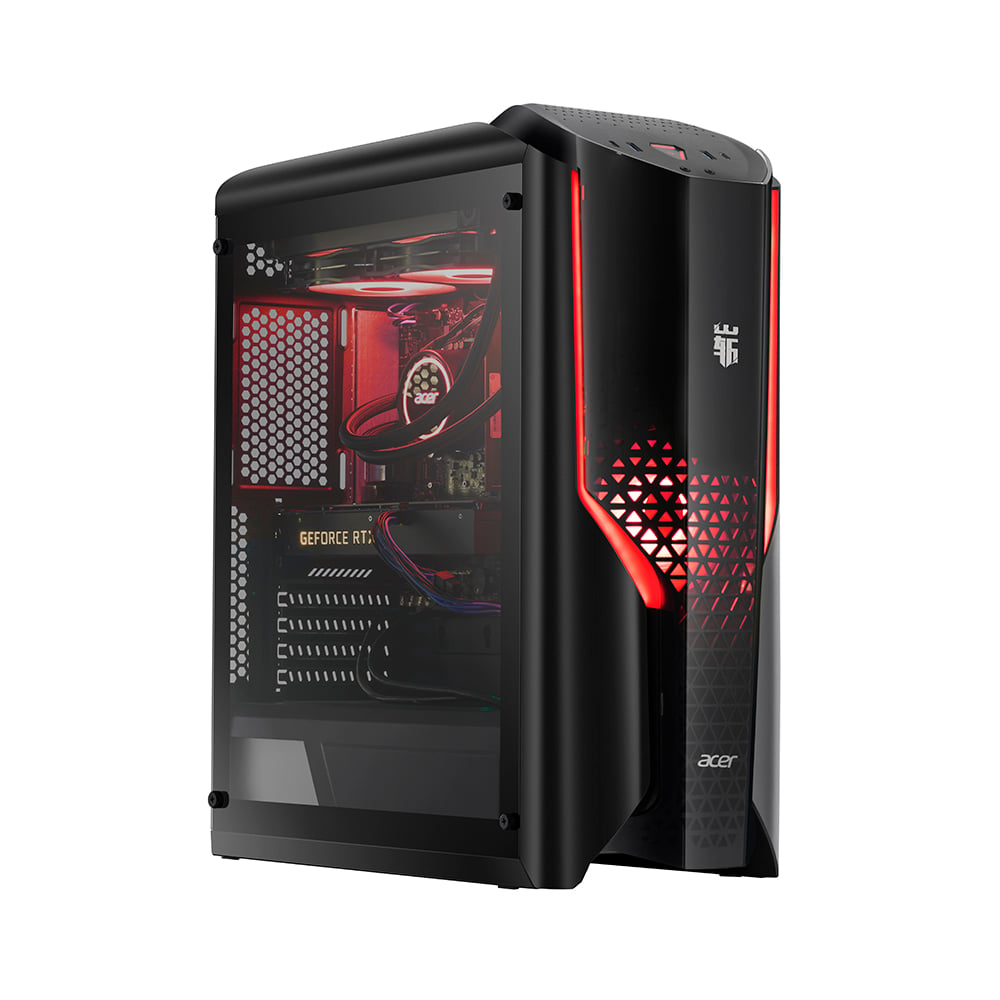
Các doanh nghiệp hiện đại đối mặt với những thách thức phức tạp đòi hỏi cơ sở hạ tầng điện toán mạnh mẽ, có khả năng hỗ trợ các hoạt động then chốt, thực hiện đa nhiệm quy mô lớn và tích hợp liền mạch với các hệ thống kinh doanh hiện có. Một máy tính để bàn thương mại giải quyết những thách thức này thông qua độ tin cậy cao hơn, việc lựa chọn linh kiện vượt trội và hỗ trợ vòng đời mở rộng phù hợp với chu kỳ lập kế hoạch của doanh nghiệp. Việc đầu tư vào phần cứng cấp thương mại mang lại những lợi ích kinh doanh thiết thực, bao gồm giảm thời gian ngừng hoạt động, giảm tổng chi phí sở hữu và nâng cao năng suất nhân viên ở mọi cấp độ trong tổ chức.
Tiêu chuẩn về Độ tin cậy và Độ bền được Nâng cao
Chất lượng Linh kiện Vượt trội và Quy trình Kiểm tra
Các hệ thống máy tính để bàn thương mại trải qua các giao thức kiểm tra nghiêm ngặt vượt xa tiêu chuẩn dành cho người tiêu dùng, đảm bảo hiệu suất ổn định trong các điều kiện doanh nghiệp khắt khe. Các nhà sản xuất tiến hành kiểm tra chạy rà (burn-in) kéo dài, kiểm tra chu kỳ nhiệt và kiểm tra tải nặng trên những hệ thống này nhằm mô phỏng nhiều năm vận hành liên tục. Quy trình lựa chọn linh kiện ưu tiên độ tin cậy thay vì tối ưu chi phí, dẫn đến việc bo mạch chủ, nguồn điện và hệ thống làm mát được thiết kế cho tuổi thọ vận hành kéo dài.
Sự khác biệt về chất lượng linh kiện thể hiện rõ qua tỷ lệ lỗi và tuổi thọ hệ thống. Ổ cứng, module bộ nhớ và bộ vi xử lý dành cho doanh nghiệp được trang bị khả năng sửa lỗi nâng cao cùng dung sai sản xuất cải thiện. Những linh kiện này trải qua thêm các quy trình đảm bảo chất lượng như kiểm tra theo lô và lấy mẫu thống kê nhằm phát hiện các vấn đề tiềm ẩn về độ tin cậy trước khi triển khai.
Các nhà sản xuất máy tính để bàn thương mại triển khai các hệ thống quản lý chất lượng toàn diện nhằm theo dõi nguồn gốc linh kiện, quy trình lắp ráp và kết quả kiểm tra sau sản xuất. Cách tiếp cận có hệ thống này đảm bảo tính nhất quán trong các đợt sản xuất và cho phép xác định nhanh chóng các vấn đề về chất lượng có thể ảnh hưởng đến việc triển khai trong môi trường doanh nghiệp. Kết quả là tỷ lệ lỗi giảm đáng kể và hành vi của hệ thống trong môi trường sản xuất trở nên dự báo được hơn.
Thời gian trung bình giữa các lần hỏng hóc mở rộng
Thời gian trung bình giữa các lần hỏng hóc (MTBF) của các linh kiện máy tính để bàn thương mại thường cao hơn từ 200–300% so với các linh kiện cùng loại dành cho người tiêu dùng, từ đó tác động trực tiếp đến khả năng duy trì hoạt động kinh doanh và hiệu quả vận hành. Các linh kiện then chốt như bộ nguồn, quạt làm mát và thiết bị lưu trữ được thiết kế nâng cao nhằm giảm thiểu hao mòn và kéo dài tuổi thọ hoạt động. Độ tin cậy được cải thiện này giúp giảm tần suất các sự cố phần cứng có thể làm gián đoạn hoạt động kinh doanh và yêu cầu sửa chữa khẩn cấp tốn kém.
Các môi trường doanh nghiệp được hưởng lợi từ các mô hình hỏng hóc có thể dự đoán được, cho phép lên lịch bảo trì chủ động và thay thế linh kiện trước khi xảy ra sự cố nghiêm trọng. Máy tính để bàn thương mại cung cấp khả năng giám sát chi tiết nhằm theo dõi tình trạng sức khỏe và các chỉ số hiệu suất của linh kiện, giúp các phòng Công nghệ thông tin xác định sớm các linh kiện đang suy giảm trước khi chúng ảnh hưởng đến hiệu suất hệ thống.
Đặc tính MTBF kéo dài của các hệ thống máy tính để bàn thương mại giúp giảm tổng chi phí sở hữu thông qua nhu cầu bảo trì thấp hơn, số lần gọi dịch vụ khẩn cấp ít hơn và chu kỳ thay thế được kéo dài. Những cải thiện về độ tin cậy này đặc biệt có giá trị trong các ứng dụng then chốt, nơi thời gian ngừng hoạt động của hệ thống ảnh hưởng trực tiếp đến việc tạo ra doanh thu và mức độ hài lòng của khách hàng.
Hỗ trợ Chuyên nghiệp và Cơ sở Dịch vụ
Bảo hành toàn diện
Các hệ thống máy tính để bàn thương mại thường bao gồm chế độ bảo hành rộng rãi nhằm đáp ứng những nhu cầu đặc thù của môi trường doanh nghiệp, bao gồm dịch vụ tại chỗ, thay thế linh kiện vào ngày làm việc tiếp theo và thời hạn bảo hành kéo dài. Các chương trình bảo hành này nhận thức rõ rằng hoạt động doanh nghiệp không thể chấp nhận thời gian ngừng hoạt động kéo dài do các dịch vụ sửa chữa tại trung tâm (depot repair) — vốn thường được áp dụng cho sản phẩm tiêu dùng. Chế độ bảo hành chuyên nghiệp bao gồm các điều khoản hỗ trợ khẩn cấp trong các giai đoạn then chốt đối với hoạt động kinh doanh cũng như quyền truy cập ưu tiên vào các nguồn lực hỗ trợ kỹ thuật.
Các chương trình bảo hành doanh nghiệp thường bao gồm dịch vụ giám sát chủ động nhằm phát hiện các sự cố tiềm ẩn trước khi chúng ảnh hưởng đến hoạt động. Các dịch vụ này tận dụng khả năng chẩn đoán từ xa được tích hợp sẵn trong các hệ thống máy tính để bàn thương mại nhằm theo dõi tình trạng sức khỏe hệ thống, các chỉ số hiệu năng và trạng thái linh kiện. Khi phát hiện các vấn đề tiềm ẩn, nhà cung cấp dịch vụ có thể tiến hành các quy trình bảo trì phòng ngừa hoặc thay thế linh kiện trước khi xảy ra sự cố.
Cấu trúc bảo hành cho các hệ thống máy tính để bàn thương mại được thiết kế phù hợp với chu kỳ ngân sách và yêu cầu mua sắm của doanh nghiệp thông qua các thỏa thuận mức độ dịch vụ linh hoạt, có thể tùy chỉnh dựa trên nhu cầu tổ chức. Các lựa chọn thường bao gồm nhiều mức đảm bảo thời gian phản hồi khác nhau, bảo hiểm cho thiệt hại do sự cố ngoài ý muốn và quy định về việc cung cấp thiết bị thay thế trong suốt thời gian sửa chữa kéo dài.
Nguồn lực Hỗ trợ Kỹ thuật Chuyên biệt
Các nhà sản xuất máy tính để bàn thương mại cung cấp các đội ngũ hỗ trợ kỹ thuật chuyên biệt, được đào tạo đặc biệt cho các tình huống triển khai tại môi trường doanh nghiệp và các ứng dụng then chốt đối với hoạt động kinh doanh. Những nguồn lực hỗ trợ này hiểu rõ mức độ phức tạp trong môi trường doanh nghiệp và có thể đưa ra hướng dẫn liên quan đến các thách thức tích hợp, tối ưu hóa hiệu năng cũng như quy trình xử lý sự cố nhằm giảm thiểu tối đa gián đoạn hoạt động kinh doanh. Cơ sở hạ tầng hỗ trợ kỹ thuật bao gồm đường dây điện thoại riêng, xử lý ưu tiên các trường hợp yêu cầu hỗ trợ và khả năng tiếp cận các kỹ sư cấp cao khi phát sinh các vấn đề phức tạp.
Hỗ trợ kỹ thuật dành cho doanh nghiệp không chỉ giới hạn ở việc khắc phục sự cố cơ bản mà còn bao gồm các dịch vụ tư vấn về lập kế hoạch triển khai, tối ưu hóa cấu hình và tích hợp với các hệ thống doanh nghiệp hiện có. Các đội hỗ trợ duy trì kiến thức chuyên sâu về các ứng dụng phần mềm doanh nghiệp, cấu hình mạng và yêu cầu bảo mật ảnh hưởng đến việc triển khai và vận hành máy tính để bàn thương mại.
Cơ sở hạ tầng hỗ trợ kỹ thuật cho các hệ thống máy tính để bàn thương mại bao gồm tài liệu hướng dẫn chi tiết, cơ sở tri thức và tài liệu đào tạo được thiết kế đặc biệt dành riêng cho các phòng Công nghệ thông tin (IT) doanh nghiệp. Những nguồn lực này giúp các đội hỗ trợ nội bộ tự giải quyết các sự cố thường gặp một cách độc lập, đồng thời vẫn duy trì khả năng tiếp cận chuyên gia của nhà sản xuất khi đối mặt với các thách thức kỹ thuật phức tạp.
Các Tính năng và Khả năng Đặc thù cho Doanh nghiệp
Các tính năng bảo mật và quản lý tiên tiến
Các hệ thống máy tính để bàn thương mại tích hợp các tính năng bảo mật tiên tiến được thiết kế nhằm đáp ứng các yêu cầu tuân thủ doanh nghiệp và bảo vệ dữ liệu kinh doanh nhạy cảm. Các khả năng bảo mật này bao gồm mã hóa dựa trên phần cứng, quy trình khởi động an toàn và tích hợp mô-đun nền tảng đáng tin cậy (TPM), từ đó cung cấp nền tảng bảo mật cơ bản cho các ứng dụng doanh nghiệp. Kiến trúc bảo mật mở rộng vượt ra ngoài việc bảo vệ bằng mật khẩu cơ bản để bao gồm xác thực sinh trắc học, đầu đọc thẻ thông minh và tích hợp với các dịch vụ thư mục doanh nghiệp.
Các khả năng quản lý từ xa được tích hợp sẵn trong các hệ thống máy tính để bàn thương mại cho phép quản trị tập trung các triển khai máy tính để bàn quy mô lớn thông qua các nền tảng quản trị doanh nghiệp. Các khả năng này bao gồm quản lý nguồn điện từ xa, cấu hình BIOS, theo dõi tài sản và triển khai phần mềm tự động — giúp giảm gánh nặng hành chính và đảm bảo cấu hình nhất quán trên toàn bộ doanh nghiệp. Cơ sở hạ tầng quản trị hỗ trợ các giao thức tiêu chuẩn ngành, tích hợp liền mạch với các công cụ quản trị doanh nghiệp hiện có.
Các tính năng bảo mật trên máy tính để bàn thương mại giải quyết những mối quan tâm đặc thù của doanh nghiệp, bao gồm ngăn chặn mất dữ liệu, tuân thủ quy định pháp lý và bảo vệ tài sản trí tuệ. Các thành phần bảo mật dựa trên phần cứng cung cấp lớp bảo vệ chống can thiệp đối với các khóa mã hóa và thông tin xác thực nhạy cảm. Những khả năng bảo mật này hoạt động độc lập với hệ điều hành, nhờ đó vẫn duy trì được sự bảo vệ ngay cả khi các biện pháp bảo mật dựa trên phần mềm bị xâm phạm.
Lợi ích về khả năng mở rộng và tiêu chuẩn hóa
Việc triển khai hệ thống máy tính để bàn thương mại trong doanh nghiệp được hưởng lợi từ các khả năng tiêu chuẩn hóa giúp đơn giản hóa quy trình mua sắm, triển khai và quản lý thường xuyên. Các nhà sản xuất cung cấp các cấu hình phần cứng và thông số kỹ thuật nhất quán, duy trì ổn định trong suốt vòng đời sản phẩm kéo dài, cho phép doanh nghiệp duy trì các ảnh hệ thống và mẫu cấu hình tiêu chuẩn trên các triển khai quy mô lớn. Việc tiêu chuẩn hóa này làm giảm độ phức tạp cũng như yêu cầu đào tạo đối với đội ngũ hỗ trợ CNTT.
Các hệ thống máy tính để bàn thương mại hỗ trợ các phương pháp triển khai có khả năng mở rộng, bao gồm tạo ảnh qua mạng, cấu hình tự động và cấp phát không cần thao tác (zero-touch provisioning), giúp giảm thiểu yêu cầu cài đặt và cấu hình thủ công. Những khả năng này cho phép triển khai nhanh chóng các hệ thống mới cũng như quản lý cấu hình một cách nhất quán trên nhiều địa điểm và nhóm người dùng khác nhau. Khả năng mở rộng còn được duy trì trong suốt quá trình quản trị tiếp theo thông qua giám sát tập trung và các chức năng bảo trì tự động.
Lợi ích từ việc chuẩn hóa các hệ thống máy tính để bàn thương mại bao gồm các lộ trình nâng cấp và chiến lược di chuyển dự báo được, phù hợp với chu kỳ lập kế hoạch của doanh nghiệp. Các nhà sản xuất cung cấp thông báo trước về các thay đổi sản phẩm và duy trì tính tương thích ngược đối với các công cụ quản trị cũng như các mẫu cấu hình. Cách tiếp cận này giúp doanh nghiệp lập kế hoạch chu kỳ làm mới công nghệ và dự toán ngân sách cho việc cập nhật phần cứng mà không làm gián đoạn hoạt động hiện tại.
Giá Trị Dài Hạn và Tổng Chi Phí Sở Hữu
Hỗ trợ vòng đời sản phẩm kéo dài
Các nhà sản xuất máy tính để bàn thương mại cung cấp hỗ trợ vòng đời sản phẩm kéo dài, phù hợp với chu kỳ lập kế hoạch và ngân sách của doanh nghiệp, thường duy trì khả năng cung cấp linh kiện và hỗ trợ kỹ thuật trong khoảng năm đến bảy năm sau khi sản phẩm được ra mắt lần đầu. Khoảng thời gian hỗ trợ kéo dài này giúp các doanh nghiệp tối đa hóa khoản đầu tư vào phần cứng và đồng bộ hóa chu kỳ thay thế thiết bị với lịch khấu hao tài sản cũng như quy trình lập kế hoạch ngân sách. Việc hỗ trợ vòng đời dự báo trước được giúp giảm thiểu rủi ro lỗi thời sớm và chi phí thay thế phần cứng ngoài kế hoạch.
Hỗ trợ dài hạn bao gồm việc tiếp tục cung cấp các linh kiện thay thế, trình điều khiển thiết bị được cập nhật và kiểm tra tính tương thích với các phiên bản hệ điều hành mới cũng như các ứng dụng doanh nghiệp. Các hệ thống máy tính để bàn thương mại được ưu tiên xem xét để cập nhật tính tương thích và các bản vá bảo mật nhằm đảm bảo hoạt động liên tục trong các môi trường doanh nghiệp đang không ngừng phát triển. Sự hỗ trợ liên tục này giúp giảm tổng chi phí sở hữu bằng cách kéo dài tuổi thọ sử dụng của các khoản đầu tư vào phần cứng.
Chính sách hỗ trợ vòng đời mở rộng dành cho các hệ thống máy tính để bàn thương mại bao gồm hỗ trợ di chuyển dữ liệu và hướng dẫn lộ trình nâng cấp, giúp các doanh nghiệp chuyển đổi sang các nền tảng phần cứng mới khi việc thay thế trở nên cần thiết. Các nhà sản xuất cung cấp thông tin chi tiết về tính tương thích cùng kết quả kiểm tra để đảm bảo quá trình chuyển đổi diễn ra suôn sẻ, không làm gián đoạn hoạt động kinh doanh hay yêu cầu cấu hình lại quy mô lớn đối với các ứng dụng doanh nghiệp.
Năng suất và Hiệu quả Vận hành
Độ tin cậy và các đặc tính hiệu năng của các hệ thống máy tính để bàn thương mại chuyển hóa thành những cải thiện năng suất đo lường được đối với người dùng doanh nghiệp thông qua việc giảm thời gian ngừng hoạt động, tăng tốc độ xử lý ứng dụng và hạn chế các gián đoạn kỹ thuật. Những lợi ích về năng suất này tích lũy theo thời gian khi nhân viên có thể tập trung vào các nhiệm vụ then chốt của doanh nghiệp thay vì phải giải quyết các sự cố liên quan đến phần cứng cũng như các giới hạn về hiệu năng. Trải nghiệm người dùng được nâng cao góp phần gia tăng mức độ hài lòng trong công việc và giảm nhu cầu hỗ trợ CNTT.
Các hệ thống máy tính để bàn thương mại hỗ trợ các ứng dụng doanh nghiệp đòi hỏi cao, bao gồm thiết kế hỗ trợ bằng máy tính (CAD), mô hình hóa tài chính và các công cụ phân tích dữ liệu – những ứng dụng yêu cầu hiệu năng ổn định và độ tin cậy cao. Các khả năng xử lý nâng cao cùng cấu hình bộ nhớ tối ưu của các hệ thống thương mại cho phép thực hiện đa nhiệm hiệu quả và vận hành đồng thời nhiều ứng dụng kinh doanh mà không làm suy giảm hiệu năng. Khả năng này trực tiếp ảnh hưởng đến năng suất lao động của nhân viên cũng như hiệu quả của các quy trình kinh doanh.
Lợi ích về tổng chi phí sở hữu (TCO) của các hệ thống máy tính để bàn thương mại không chỉ giới hạn ở chi phí phần cứng ban đầu, mà còn bao gồm nhu cầu hỗ trợ giảm thiểu, tỷ lệ hỏng hóc thấp hơn và chu kỳ thay thế kéo dài hơn. Các tổ chức doanh nghiệp thường đạt được mức tổng chi phí sở hữu thấp hơn 20–30% trong khoảng thời gian năm năm so với các giải pháp dành cho người tiêu dùng, khi tính đến cả các yếu tố như gia tăng năng suất, chi phí hỗ trợ giảm và vòng đời phần cứng được kéo dài.
Câu hỏi thường gặp
Điều gì khiến các hệ thống máy tính để bàn thương mại đáng tin cậy hơn các mẫu dành cho người tiêu dùng?
Các hệ thống máy tính để bàn thương mại sử dụng các linh kiện chất lượng cao hơn, đã trải qua quá trình kiểm tra và đảm bảo chất lượng nghiêm ngặt. Những hệ thống này được trang bị nguồn điện nâng cao, hệ thống làm mát cải tiến và thiết bị lưu trữ cấp doanh nghiệp với tỷ lệ lỗi thấp hơn. Quy trình sản xuất bao gồm kiểm tra chạy rà (burn-in) và kiểm tra tải nặng (stress testing) vượt xa tiêu chuẩn áp dụng cho sản phẩm dành cho người tiêu dùng, từ đó giúp tăng đáng kể thời gian trung bình giữa hai lần hỏng hóc (MTBF) cũng như độ tin cậy tổng thể của hệ thống.
Chương trình bảo hành máy tính để bàn thương mại khác biệt như thế nào so với chương trình bảo hành dành cho người tiêu dùng?
Các chế độ bảo hành máy tính để bàn thương mại thường cung cấp dịch vụ tại chỗ, thay thế linh kiện vào ngày làm việc tiếp theo và thời hạn bảo hành kéo dài nhằm đáp ứng các yêu cầu vận hành của doanh nghiệp. Các chế độ bảo hành này bao gồm quyền truy cập hỗ trợ kỹ thuật ưu tiên, dịch vụ giám sát chủ động và các thỏa thuận mức độ dịch vụ (SLA) có thể tùy chỉnh. Khác với các chế độ bảo hành dành cho người tiêu dùng — vốn dựa vào dịch vụ sửa chữa tại trung tâm bảo hành — các chế độ bảo hành thương mại giảm thiểu gián đoạn hoạt động kinh doanh thông qua dịch vụ tại chỗ nhanh chóng và khả năng cung cấp thiết bị cho mượn.
Các hệ thống máy tính để bàn thương mại có thể tích hợp với cơ sở hạ tầng CNTT hiện có của doanh nghiệp không?
Các hệ thống máy tính để bàn thương mại được thiết kế đặc biệt nhằm tích hợp vào môi trường doanh nghiệp, với khả năng tương thích với các nền tảng quản trị doanh nghiệp, dịch vụ thư mục và giao thức bảo mật. Những hệ thống này hỗ trợ các giao diện quản trị chuẩn công nghiệp, khả năng quản trị từ xa và các công cụ triển khai tập trung. Các tính năng tích hợp bao gồm các tính năng bảo mật dựa trên phần cứng, hỗ trợ khởi động qua mạng (network boot) cũng như khả năng tương thích với các ứng dụng phần mềm doanh nghiệp và hệ thống xác thực.
Chênh lệch chi phí điển hình giữa các hệ thống máy tính để bàn thương mại và hệ thống dành cho người tiêu dùng là bao nhiêu?
Mặc dù các hệ thống máy tính để bàn thương mại thường có giá cao hơn từ 15–25% so với các mẫu tiêu dùng tương đương ngay từ đầu, nhưng tổng chi phí sở hữu (TCO) trong khoảng thời gian năm năm thường lại nghiêng về phía các hệ thống thương mại. Sự chênh lệch về chi phí này được bù đắp nhờ chế độ bảo hành kéo dài, tỷ lệ hỏng hóc thấp hơn, nhu cầu hỗ trợ giảm đi và chu kỳ thay thế thiết bị dài hơn. Các tổ chức doanh nghiệp nên đánh giá tổng chi phí sở hữu, bao gồm cả lợi ích về năng suất, chi phí hỗ trợ và vòng đời phần cứng khi so sánh các lựa chọn máy tính để bàn thương mại và tiêu dùng.
Mục lục
- Tiêu chuẩn về Độ tin cậy và Độ bền được Nâng cao
- Hỗ trợ Chuyên nghiệp và Cơ sở Dịch vụ
- Các Tính năng và Khả năng Đặc thù cho Doanh nghiệp
- Giá Trị Dài Hạn và Tổng Chi Phí Sở Hữu
-
Câu hỏi thường gặp
- Điều gì khiến các hệ thống máy tính để bàn thương mại đáng tin cậy hơn các mẫu dành cho người tiêu dùng?
- Chương trình bảo hành máy tính để bàn thương mại khác biệt như thế nào so với chương trình bảo hành dành cho người tiêu dùng?
- Các hệ thống máy tính để bàn thương mại có thể tích hợp với cơ sở hạ tầng CNTT hiện có của doanh nghiệp không?
- Chênh lệch chi phí điển hình giữa các hệ thống máy tính để bàn thương mại và hệ thống dành cho người tiêu dùng là bao nhiêu?