 EN
 AR
 BG
 HR
 CS
 DA
 NL
 FR
 DE
 EL
 HI
 IT
 JA
 KO
 NO
 PL
 PT
 RO
 RU
 ES
 SV
 TL
 IW
 ID
 SR
 SK
 VI
 HU
 TH
 TR
 FA
 AF
 MS
 SW
 UR
 BN
 HA
 KM
 MN
 UZ

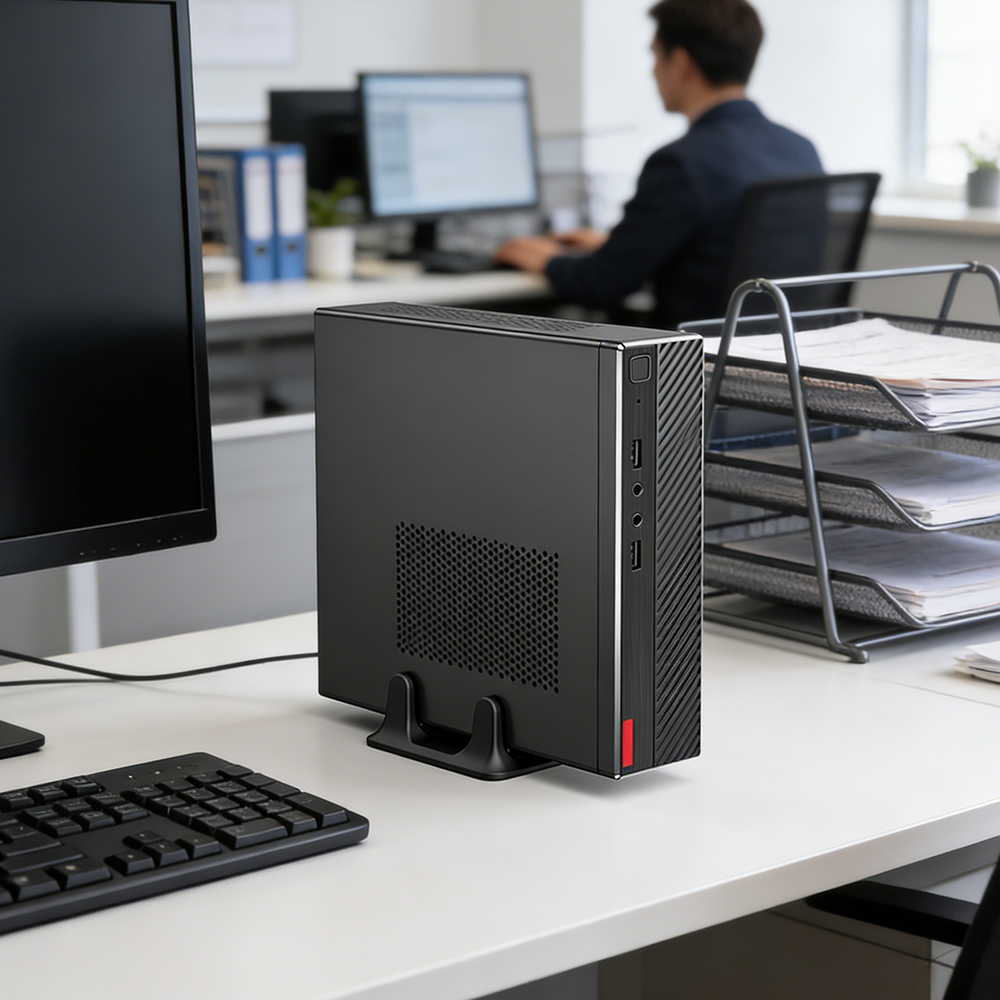
A business mini pc can improve office hardware efficiency by delivering the computing resources employees need in a smaller, easier-to-place device. Its value is not simply a compact footprint: the right business mini pc can also simplify workstation layouts, standardize deployment, and make hardware refreshes easier to plan. Efficiency depends on matching the device to real workloads rather than choosing a small computer by appearance alone.
.jpg)
For office managers and IT teams, the practical question is how a business mini pc changes the work involved in equipping and maintaining desks. Benefits can include more usable desk space, consistent configurations, and flexible placement behind a display or on a mounting point. A business mini pc is most efficient when its ports, processing capability, memory, storage, and support arrangements suit the role it will perform.
How compact hardware changes the office setup
Recovering desk and floor space
A conventional desktop tower occupies floor or desk area and can complicate cable routing. A business mini pc reduces the computer’s physical presence, leaving more room for documents, peripherals, or shared work surfaces. In reception areas, training rooms, and compact workstations, this can make the layout easier to use without changing the employee’s core software. The business mini pc still needs ventilation and safe access to its connections.
Placement flexibility is useful when desks vary across departments or when a workstation must be installed in a customer-facing space. A business mini pc may sit beside a monitor, attach to a compatible mount, or fit into a designated equipment area, depending on its design. Before standardizing a business mini pc, facilities and IT staff should confirm mounting compatibility, airflow, power access, and the cable paths required at each desk.
Reducing setup friction
A smaller device can make workstation assembly and relocation less cumbersome, especially where computers are moved between rooms or attached to displays. With a documented configuration, a business mini pc can be prepared using the same operating system image and approved applications as other role-based devices. That consistency helps technicians repeat setup steps and makes the business mini pc easier to inventory, assign, and troubleshoot.
Compact size alone does not eliminate deployment work. IT teams still need to label equipment, record serial numbers, secure devices, test displays, and verify network access. A business mini pc supports a more controlled rollout when procurement specifies consistent memory, storage, wireless or wired networking, and ports. The outcome is a repeatable workstation standard, not an automatic reduction in every installation task.
How right-sizing improves daily hardware use
Matching computing capacity to employee roles
Office jobs differ: a browser-based service desk, a finance workstation, and a design role do not place the same demands on hardware. A business mini pc can be efficient for routine productivity when its processor, memory, and storage are suitable for the applications and multitasking employees use. Choosing a business mini pc by role helps avoid paying for capacity that remains unused or assigning a device that feels slow under normal workloads.
Start with the software requirements, number of active applications, display needs, and expected device life. Then check whether the business mini pc supports the required monitor connections, peripherals, and network access. Where staff use specialized software or intensive data tasks, validate performance with representative workloads before deployment. A business mini pc that meets the actual job requirement is a better efficiency decision than one selected only for its size.
Making power and peripheral choices deliberate
Hardware efficiency also depends on how a workstation is connected and operated. A business mini pc paired with suitable displays and peripherals can create a tidy desk with fewer unnecessary accessories, but the exact setup depends on the device’s ports and the organization’s standards. Confirm that a business mini pc can support the required display resolution, wired network, headset, storage devices, and any security equipment employees need.
Power use should be assessed through the device specifications and the organization’s operating profile rather than assumed from its compact form. Compare the business mini pc with the current hardware under relevant workloads, and consider sleep settings, uptime, and peripheral consumption. Such a review gives facilities teams a more realistic picture of operating needs. A business mini pc may contribute to a streamlined setup, while measured usage should guide energy decisions.
How IT teams can sustain efficiency over time
Standardizing support and lifecycle practices
Standardization can make routine support more predictable across multiple desks. When a business mini pc is configured consistently by job type, technicians can use familiar deployment, update, and diagnostic procedures. Centralized asset records should include assigned users, configuration, warranty details, and location. This makes each business mini pc easier to identify during a support request and helps teams plan replacements using evidence rather than guesswork.
Lifecycle planning should account for repair access, upgrade options, security requirements, and the availability of compatible replacement components. Not every business mini pc offers the same serviceability, so procurement and IT should review the specifications before setting a refresh policy. A clear support process also defines who handles operating system updates, backups, and device returns. These steps preserve operational consistency beyond the initial installation of a business mini pc.
Choosing a fit for each office scenario
A compact workstation may suit administrative desks, shared counters, meeting rooms, and information stations where space is constrained and workloads are defined. A business mini pc is less suitable when a role depends on expansion capacity or demanding graphics unless the selected configuration has been validated for that purpose. Matching the business mini pc to its environment prevents compact dimensions from becoming a limitation later.
Before rollout, map user roles to software, displays, peripherals, mounting needs, and support expectations. Pilot the proposed business mini pc in representative work areas, then collect feedback on responsiveness, connection access, and desk usability. A business mini pc earns its place when the trial confirms that employees can complete normal tasks and IT can manage the device within existing processes.
FAQ
Does a business mini pc work for everyday office tasks?
Yes, a business mini pc can handle everyday office tasks when its specifications match the workload. Check the required applications, memory, storage, display support, and peripherals before deployment. Roles using demanding software should be tested separately rather than assumed to fit a general office configuration.
Can a business mini pc make workstation installation easier?
It can simplify placement and cable management because the device takes up less space than many tower systems. Installation still requires careful planning for mounting, ventilation, power, network access, and display connections. Standardized configurations help make repeat installations more consistent.
What should IT check before choosing one?
Review workload requirements, ports, monitor compatibility, security, serviceability, and the support lifecycle. A pilot can expose practical issues with the proposed business mini pc before a wider rollout. Compare expected use with verified specifications, then document a configuration that IT can support consistently.